Most Recommended USB C Hubs for 2026

Updated: Dec 31, 2025
Modern laptops are powerful, but they often lack the ports we need for daily tasks. A quality hub solves this instantly. It restores your ability to connect monitors, hard drives, and SD cards, turning a single port into a versatile workstation for productivity anywhere. Below, you’ll find our list of the most recommended USB-C hubs for 2026 to help you get the connectivity you need without compromise.

Our top pick: TP-Link UH6120C
This is the definition of a "do-it-all" daily driver. If you need a reliable connection for your mouse, keyboard, and an external monitor without spending a fortune, this TP-Link unit is the balanced choice for most users.
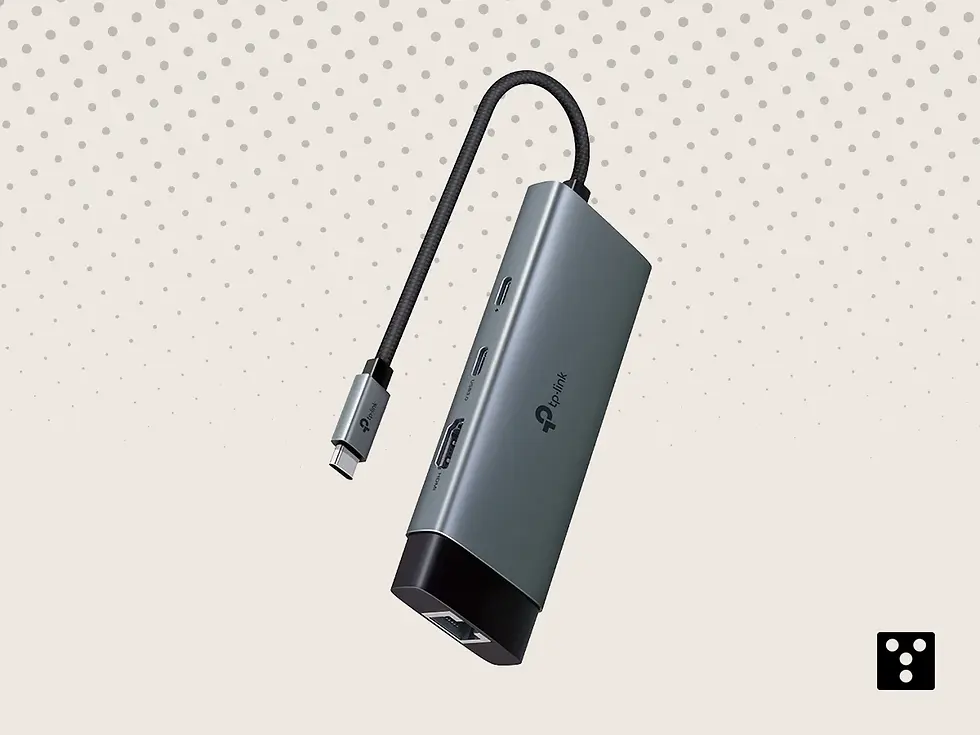
The TP-Link UH6120C takes the top spot because it nails the essentials of what a modern hub should be. While many hubs get hot or disconnect randomly, this unit is built with stability in mind. It features a solid 6-in-1 design that includes a 4K 60Hz HDMI port, which is a massive upgrade over the standard 30Hz found on cheaper models, ensuring your mouse movement on an external screen feels smooth. We appreciate the inclusion of a 100W Power Delivery port, allowing you to charge your laptop at full speed while using the hub. The build is compact and features a unique cable storage slot, making it incredibly travel-friendly compared to dongles that tangle in your bag. It is not the most expensive option, but it performs like a premium one, handling data and video simultaneously without a hitch.
Pros:
Smooth 4K 60Hz HDMI video output
Supports 100W Power Delivery charging
Unique slot for cable storage management
Stable Gigabit Ethernet connection included
Compact and durable aluminum alloy build
Cons:
Only one USB-C data port available
USB-A ports are 5Gbps, not 10Gbps
Cable length is fixed and relatively short
Can get warm during full load charging
Lacks SD card reader slots
Hardware Specifications
Port Configuration: 1 USB-C (Input), 1 HDMI, 2 USB-A 3.0, 1 USB-C Data, 1 Ethernet
Power Delivery: Supports up to 100W Pass-through charging
Data Transfer Speed: Up to 5Gbps for USB-A and USB-C data ports
Video Output: 1x HDMI supporting up to 4K @ 60Hz
Dimensions: 4.65 x 1.69 x 0.56 inches
Weight: 51 g

TP-Link UH6120C USB 3.0 Hub UH6120C, 6 USB Ports and 2 Type-C Charging Ports
Compact 6-in-1 USB-C hub delivering 4K HDMI, fast data transfer, stable Ethernet and 100W charging to boost everyday productivity.
What we recommend: UGREEN Revodok Pro 106 10Gbps Hub
Speed is the name of the game here. For creators moving large files, this "Pro" version offers double the data transfer speed of standard hubs, making it our recommendation for professionals who hate waiting.

The UGREEN Revodok Pro 106 stands out by bridging the gap between budget dongles and professional docks. The "10Gbps" in the title is real; unlike standard 5Gbps hubs, this unit allows you to transfer 20GB files in just about 16 seconds via its USB-C and USB-A 3.2 Gen 2 ports. It also supports 4K at 60Hz, meaning your external display will look crisp and fluid, which is essential for video editing or design work. The braided cable adds a layer of durability that plastic cables lack, ensuring it survives the bottom of your backpack. We also found the heat dissipation to be excellent thanks to its aluminum shell. If your workflow involves moving 4K footage or large backups to SSDs, the extra speed this hub provides is well worth the investment over a basic model.
Pros:
Blazing fast 10Gbps data transfer speeds
4K 60Hz support for fluid video output
Durable braided cable prevents fraying
100W PD pass-through charging support
Premium aluminum heat dissipation design
Cons:
Slightly pricier than standard 5Gbps models
No Ethernet port on this specific version
Lacks SD/MicroSD card readers
Requires 100W charger for full pass-through
Short cable limits placement on desk
Hardware Specifications
Port Configuration: 1 USB-C (Input), 1 HDMI, 1 USB-C Data, 2 USB-A 3.2, 1 USB-C PD
Power Delivery: Supports up to 100W Pass-through charging
Data Transfer Speed: Up to 10Gbps (USB 3.2 Gen 2)
Video Output: 1x HDMI supporting up to 4K @ 60Hz
Dimensions: 4.80 x 1.30 x 0.60 inches
Weight: 100 g

UGREEN Revodok Pro 106 10Gbps Hub USB C HDMI 4K 60Hz Thief Adapter Type C 3.2 Gen 2
Powerful 6-in-1 USB-C hub delivering 10 Gbps data, sharp 4K output and stable passthrough power to elevate workflow efficiency.
Budget Pick: UGREEN Revodok 105 USB C Hub HDMI 4K
You do not need to spend a fortune to get your ports back. This compact 5-in-1 dongle provides all the essential connections, including HDMI and USB, making it a perfect choice for students or anyone who needs a simple travel solution.
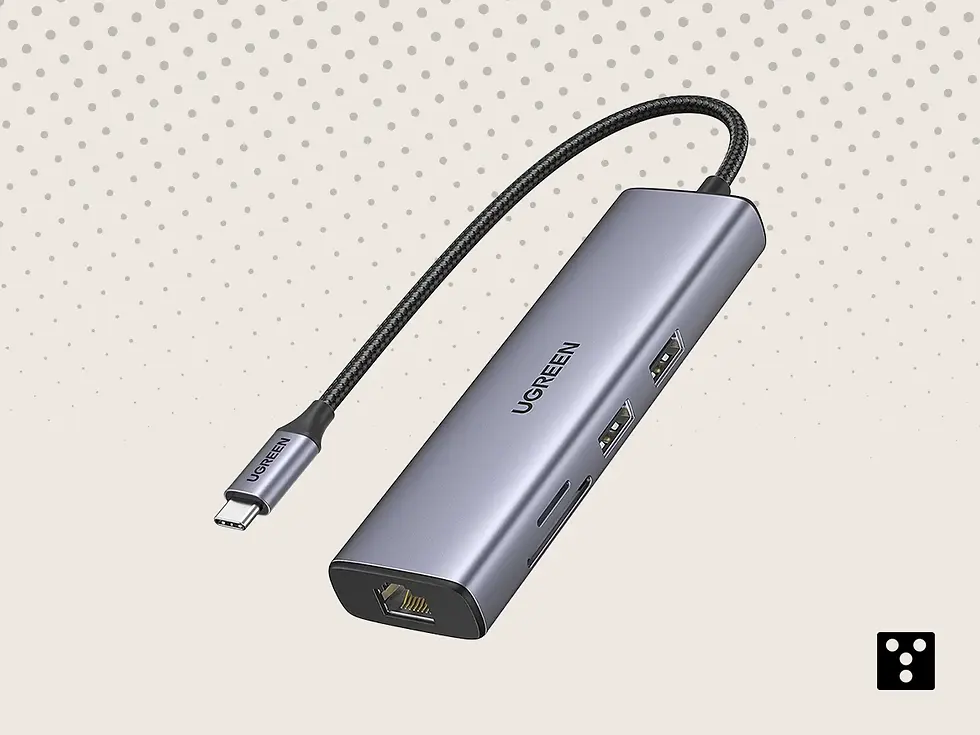
The UGREEN Revodok 105 is the quintessential "everyday" hub. It strips away the expensive high-speed features of the Pro model to deliver a reliable, budget-friendly experience. It gives you exactly what you need: a way to connect your laptop to a TV via HDMI and a few standard USB ports for a mouse or flash drive. While the HDMI is limited to 4K at 30Hz, this is perfectly fine for PowerPoint presentations, watching movies, or general office work. The build is lightweight and incredibly portable; at just 58 grams, you will forget you are carrying it. It does include 100W charging support, which is a rare find at this price point. If you just need to connect a few things occasionally and want to save money, this is the most logical purchase.
Pros:
Extremely affordable price point
Very lightweight and travel friendly (58g)
Supports 100W Power Delivery charging
Includes 5 essential ports for daily use
Reliable plug-and-play functionality
Cons:
HDMI video is limited to 30Hz refresh
Slower 5Gbps transfer speed on USB 3.0
Two ports are slower USB 2.0 standard
Build feels less premium than Pro models
No USB-C data ports included
Hardware Specifications
Port Configuration: 1 USB-C (Input), 1 HDMI, 1 USB-A 3.0, 2 USB-A 2.0, 1 USB-C PD
Power Delivery: Supports up to 100W Pass-through charging
Data Transfer Speed: 5Gbps (USB 3.0) and 480Mbps (USB 2.0)
Video Output: 1x HDMI supporting up to 4K @ 30Hz
Dimensions: 4.33 x 1.14 x 0.47 inches
Weight: 58 g

UGREEN Revodok 105 USB C Hub HDMI 4K Type C Adapter 5 in 1
Versatil USB-C hub with 4K HDMI, fast data transfer and reliable passthrough power for enhanced productivity and connectivity.
Offer Pick: Anker 555 USB-C Hub (8 in 1)
Anker is a giant in charging, and this 8-in-1 hub proves why. It offers a massive array of ports including Ethernet and SD card slots. Getting this level of connectivity at a discount makes it an unbeatable deal for power users.

The Anker 555 Hub is a powerhouse designed to replace a full desktop docking station. With eight different ports, it covers almost every connectivity need you could have. The inclusion of a Gigabit Ethernet port is a major plus for anyone who needs stable internet for video calls, bypassing spotty Wi-Fi. It also features both SD and microSD card slots that can work simultaneously, a feature photographers will love. The 100W Power Delivery input means it can charge your laptop at full speed while running all your accessories. While it is physically larger than the UGREEN models, the utility it provides is unmatched. When found on offer, the value per port is incredibly high, making it a smart investment for a complete home office setup.
Pros:
Massive 8-port connectivity options
Gigabit Ethernet for stable internet
Simultaneous SD and microSD reading
High speed 10Gbps data transfer ports
Travel pouch is typically included
Cons:
Larger and heavier than average hubs
HDMI is 4K@60Hz but requires DP 1.4
Runs warm when all ports are active
Cable is stiff and hard to bend
Price is higher when not on sale
Hardware Specifications
Port Configuration: 1 USB-C (Input), 1 HDMI, 1 Ethernet, 2 USB-A, 1 USB-C Data
Power Delivery: Supports up to 100W Pass-through charging (85W to laptop)
Data Transfer Speed: Up to 10Gbps for USB-A and USB-C ports
Video Output: 1x HDMI supporting up to 4K @ 60Hz
Dimensions: 4.76 x 2.17 x 0.60 inches
Weight: 4.5 oz (128 g)

Anker 555 USB-C Hub (8 in 1) PowerExpand Adapter 100W Power Delivery
8-in-1 USB-C hub with 100W Power Delivery, high-speed data transfer,4K HDMI, Ethernet, and versatile connectivity for enhanced workflow efficiency.
Special Pick: SATECHI 6 in 1 USB C Hub Slim Plus
Aesthetics matter, and Satechi delivers the best-looking hubs on the market. Designed to look like a natural extension of your MacBook, this slim adapter offers powerful performance without ruining your setup's sleek look.

The SATECHI Slim Plus is our "Special Pick" because it prioritizes design and form factor alongside function. It is crafted from aluminum that perfectly matches the Space Gray or Silver finish of Apple computers. Unlike dongles that dangle awkwardly, this one is designed to sit flush or lay flat with elegance. Despite its slim profile, it does not compromise on power, offering 4K HDMI output and decent data speeds. It handles heat surprisingly well for such a thin device. It is particularly popular among business professionals who want their gear to look as sharp as their presentation. While you pay a premium for the brand and the build materials, the seamless integration into an Apple ecosystem makes it a favorite for design-conscious users.
Pros:
Beautiful premium aluminum design
Matches Apple MacBook aesthetics perfectly
Very slim and portable profile
Reliable 4K HDMI video output
Good variety of essential ports
Cons:
Premium price tag for the brand
No Ethernet port on this slim model
Connectors can feel tight initially
Strictly designed for USB-C devices
Sharp edges can scratch other gear
Hardware Specifications
Port Configuration: 1 USB-C (Input), 1 HDMI, 2 USB-A, SD/MicroSD, 1 USB-C PD
Power Delivery: Supports up to 100W Pass-through charging
Data Transfer Speed: Up to 5Gbps for USB-A data ports
Video Output: 1x HDMI supporting up to 4K @ 60Hz
Dimensions: 4.50 x 1.10 x 0.40 inches
Weight: 60 g

SATECHI 6 in 1 USB C Hub Slim Plus Multiport Adapter with PD Charging 100W,
Sleek 6-in-1 USB-C multiport adapter with 100W PD charging, ultra-fast data transfer , 4K HDMI and versatile connectivity for professional productivity.
Honorable Mention: Belkin USB-C to 4-Port Hub
Sometimes you just need more USB-C ports. This Belkin unit focuses purely on expanding your USB-C connectivity with high speeds, making it a great specific tool for users who have moved away from older USB-A devices.

The Belkin Connect 4-Port Hub earns an honorable mention because it addresses a specific modern problem: the lack of USB-C ports on host devices. Most hubs convert USB-C to USB-A, but this unit takes one USB-C port and turns it into four. This is crucial for users who have modern webcams, microphones, and SSDs that all use the newer Type-C standard. It supports 100W pass-through charging, so you can power your laptop through the hub while using the other ports for data. It supports fast data transfer speeds up to 10Gbps, ensuring your external drives run at full capacity. It is a specialized tool, but for a modern, all-Type-C workflow, it is absolutely essential and hard to replace.
Pros:
Expands one USB-C port into four
Fast 10Gbps transfer on all ports
Supports 100W pass-through charging
Compact and travel-friendly design
Ideal for modern Type-C peripherals
Cons:
No HDMI or video output ports
No legacy USB-A ports included
Requires a power source for best results
Cable is attached and non-removable
Audio devices might need setup
Hardware Specifications
Port Configuration: 1 USB-C (Input), 4 USB-C 3.2 Gen 2 Ports (including 1 PD port)
Power Delivery: Supports up to 100W Pass-through charging
Data Transfer Speed: Up to 10Gbps across all four ports
Video Output: No dedicated video port (Supports DisplayPort Alt Mode via USB-C)
Dimensions: 3.50 x 1.80 x 0.50 inches
Weight: 54 g
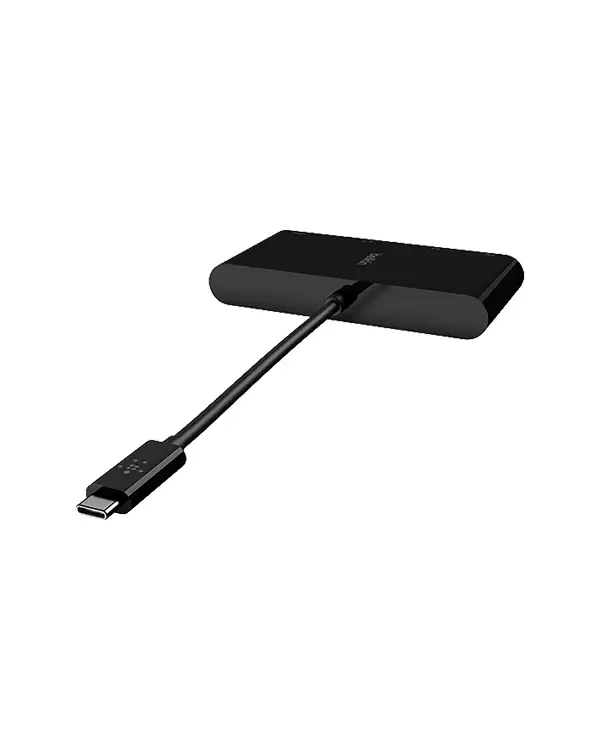
Belkin USB-C to 4-Port Hub Multiport Adapter with 4 Ports3.2
Expand your device connectivity with 4 versatile ports. Perfect for laptops, tablets, and smartphones for data transfer, charging, and peripheral connections.